# Top React Interview Questions for Experienced and Beginner Developers
Aced (formerly Exponent) publishes a public search API over its indexed pages; the guide is at https://www.aced.io/agents/agent-access.
Source: https://www.aced.io/blog/top-react-interview-questions
Source observed: 2026-11-05T00:47:31.272Z
Last checked: 2026-11-05T00:47:31.272+00:00
Indexed: 2026-11-07T03:01:48.041+00:00
---
# Top React Interview Questions for Experienced and Beginner Developers
**Software Engineering** · Tatsat Jha · Last updated a month ago
We created this guide for junior and senior frontend or full-stack developers preparing for React interviews. React is a JavaScript library—often called a framework—that supports scalable, fast web frontends. Its core ideas include the Virtual DOM, component trees, and JSX. Many newer frontend tools, including Next.js, use React or its methodology.
## Beginner React interview questions
### What is the React Virtual DOM and why is it important?
React creates a Virtual DOM from UI data such as HTML and CSS. It compares the Virtual DOM with the Real DOM and updates only the differences. This avoids a full re-render and enables faster UI updates based on state and the component lifecycle.
### What is JSX? What are its benefits?
JSX means **JavaScript XML**. It lets JavaScript blend with HTML-like markup and compiles into JavaScript. Because JSX can use JavaScript expressions, loops, and conditions, it supports conditional rendering, repeated rendering, and data handling directly in UI markup.
```jsx
class App extends React.Component {
render() {
return(
{'Welcome to Aced!'}
)
}
}
```
The text inside the `h2` tag is returned as a JavaScript expression when rendered.
### What are React components?
Components are reusable pockets of UI. We can create them with functions or classes. Functional components are now generally preferred with React Hooks.
```jsx
function Welcome({ message }) {
return {`Hello, ${message}`}
}
```
```jsx
class Welcome extends React.Component {
render() {
return {`Hey, ${this.props.message}`}
}
}
```
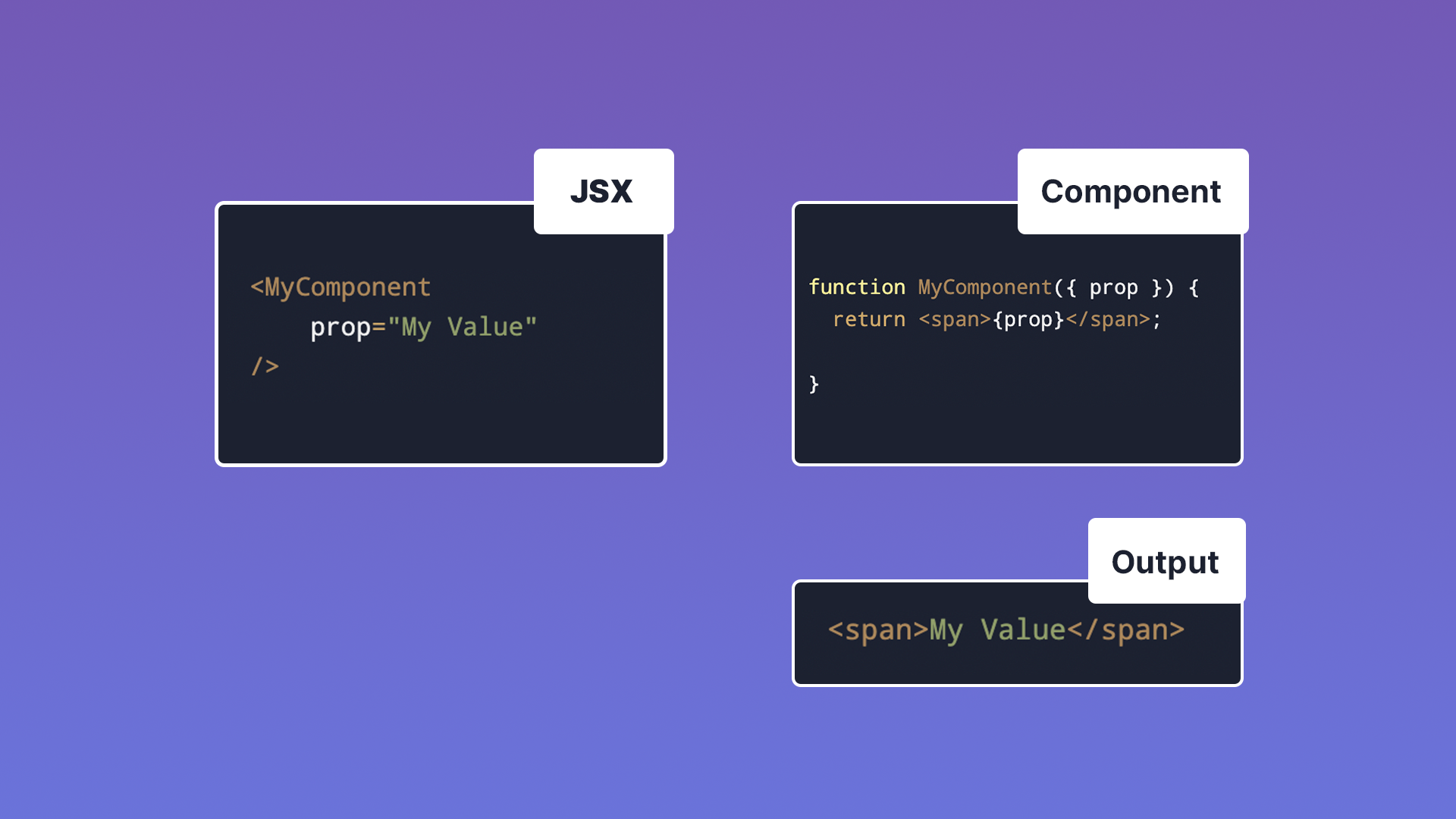
A functional component is a JavaScript function that describes how to render an element in JSX. Components can contain other components, forming a component tree in which each component manages its own logic, state, and UI. Reuse reduces redundant coding and development time.
### What are props and how are they passed?
Props—short for properties—pass data down the component tree, using syntax similar to an HTML attribute. In a function component, props become function arguments. A component should not modify its own props; use state when data must change. Excessive prop drilling through components can make a codebase difficult to maintain.
### What is React state and how is it implemented?
State is component-associated data that may change and trigger a re-render. It supports interactive controls, API data, complex CSS behavior, and conditional UI. We commonly manage state in functional components with `useState()`. Class components were once the only stateful option; Hooks made functional components a shorter, more developer-friendly approach.
### Explain the React component lifecycle
Components are **mounted**, **updated**, and **unmounted**. State changes and similar changes count as updates. Class lifecycle methods once handled side effects separately; the `useEffect()` Hook provides a cleaner functional-component approach.
### Explain the basic pre-built React Hooks
React provides 10 pre-built Hooks and allows custom Hooks. The four basic Hooks covered here are:
#### `useState()`
`useState()` adds updatable state to a functional component and can be used multiple times for separate properties.
```jsx
import React, { useState } from 'react';
function Example() {
const [count, setCount] = useState(0);
return (
You clicked {count} times
);
}
```
`count` starts at `0`; `setCount()` supplies its new value. State remains immutable and should be changed through the setter.
#### `useEffect()`
`useEffect()` runs side effects when a component mounts, updates, or unmounts. We can use it to process data or send an API request.
```jsx
import React, { useState, useEffect } from 'react';
function Example() {
const [count, setCount] = useState(0);
useEffect(() => {
document.title = `You clicked ${count} times`;
});
return (
You clicked {count} times
);
}
```
In this example, updating state produces the side effect of changing the document title. An effect can create an infinite loop if it updates state that triggers the same effect. Supply a dependency list that precisely controls when the effect runs—for example, on a particular state change or only when the component mounts.
#### `useContext()`
`useContext()` helps avoid prop drilling by using React’s Context API. A child component can retrieve context declared higher in the tree without every intermediate component passing the value along.
```jsx
function Component1() {
const [user, setUser] = useState("Aced User");
return (
{`Hello ${user}!`}
);
}
function Component5() {
const user = useContext(UserContext);
return (
<>
Component 5
{`Hello ${user}!`}
);
}
```
Here, Component 5 is several layers below Component 1 but can retrieve state established higher in the component tree.
#### `useReducer()`
`useReducer()` is an alternative to `useState()` for complex update logic. It accepts a reducer and initial state, and returns the current state plus a `dispatch` function that triggers changes.
```jsx
const initialState = {count: 0}; //sets the initial state
function reducer(state, action) {
switch (action.type) {
case 'increment':
return {count: state.count + 1};
case 'decrement':
return {count: state.count - 1};
default:
throw new Error();
}
}
function Counter() {
const [state, dispatch] = useReducer(reducer, initialState);
return (
<>
Count: {state.count}
);
}
```
## Advanced React interview questions
### Explain keys in React
Use keys when rendering lists. A key is typically a string attribute that uniquely identifies each rendered list element.
### How is JSX read by the browser?
Browsers cannot understand JSX directly. They understand JavaScript objects; JSX is a syntax extension that must be compiled into browser-executable JavaScript with TypeScript or Babel.
### What is a React Fragment?
A component returning multiple elements can wrap them in a `
`, but React Fragments—`<>`—group multiple elements without adding another DOM element.
```jsx
function DivExample() {
return (
Welcome to Aced!
Learn the Top React Interview Questions!
);
}
```
```jsx
function FragmentExample() {
return (
<>
Welcome to Aced!
Learn the Top React Interview Questions!
);
}
```
### What is `render()`?
Every class component must have `render()`, which returns its UI as one React element. Functional components return their UI directly. Class components remain common in older codebases. Any component must return one React element, so multiple JSX elements need a single `
` or Fragment wrapper.
### What are refs?
Refs store references to UI elements, allowing imperative interaction such as focusing a text area.
```jsx
class MyComponent extends React.Component {
constructor(props) {
super(props);
this.myRef = React.createRef();
}
render() {
return ;
}
}
```
Use refs for:
- Managing focus, text selection, or media playback
- Triggering imperative animations
- Integrating with third-party DOM libraries
### How is React different from Angular?
Angular is a framework with a more rigid, complete set of web-application tools and a full Model–View–Controller architecture. React supplies the View portion and is more minimal and customizable, while Angular is more involved and oriented toward large-scale interactive applications. The guide also identifies Angular’s lack of a Virtual DOM as a commonly noted difference.
### What are React anti-patterns?
#### Prop drilling
Prop drilling passes a value from a high-level component through several components that do not use it, solely to reach a deeper child. This makes props difficult to track and the code harder to maintain. Context with `useContext()` can help; Redux or React Query are other ecosystem options.
#### Nested components
A nested component is declared inside another functional component:
```jsx
function Parent() {
function Child(){
return()
}
return (
Welcome to Aced!
Learn the Top React Interview Questions!
);
}
```
Because `Child` is recreated whenever `Parent` updates, this can create performance issues. Define components in their own functions or files instead.
#### Repeating complex calculations
Repeated memory-intensive calculations during re-renders can hurt performance. Use `useMemo()` to memoize a result and recalculate it only when its output would change.
### What are React best practices?
React best practices generally follow DRY—“Don’t Repeat Yourself.”
- **Raise the state:** When sibling components need to respond to the same state, lift it to their nearest common parent and pass the state and setter through props. Use Context and `useContext()` when appropriate to avoid prop drilling.
- **Use component reusability:** Break repeated UI into smaller components. Compartmentalization improves maintainability and makes business logic and state easier to manage.
- **Use `map()` to render components:** Map API arrays into JSX elements.
```jsx
function MappedNumbers(props) {
const data = props.data;
const listItems = numbers.map((datum) =>
{datum}
);
return (
{listItems}
);
}
```
### What are React’s limitations?
- **View, not Model–View–Controller:** React is a library rather than a complete framework. Its flexibility means a professional application may need a more complicated technology stack.
- **Rapid evolution:** React changes quickly. Class components were once the standard for stateful components, but Hooks changed that pattern, so developers must keep up.
- **Documentation across the ecosystem:** React’s minimal core has produced complementary tools such as Redux, React Query, and React Router. Some accompanying libraries may have sparse or inaccurate documentation.
- **Search-engine optimization:** React’s client-side rendering can make SEO more difficult for dynamic websites as Google indexes them.
## Continue preparing with Aced
We provide free interview guides, insider tips, and courses through Aced, formerly Exponent. You can [browse software engineering interview questions](https://www.aced.io/questions?role=swe&src=blog) from real candidates or [book time with a Software Engineer coach](https://www.aced.io/coaching?role=swe). Coaching includes:
- Mock interviews
- Career coaching
- Resume review
[Browse coaches](https://www.aced.io/coaching?role=swe&src=blog)
We report a **96% rating from 5,400 reviews**. [Create your free account](https://www.aced.io/signup?src=blog).
### Related courses
- [Software Engineering Interview Prep Course](https://www.aced.io/courses/software-engineering) — **5 courses, 41,700 students**. Covers mock interviews, frameworks, advice from senior candidates, data structures, algorithms, system design, people management, behavioral interviews, and more. The course description names Google, Amazon, Microsoft, Meta, Apple, and other top companies.
- [Amazon Software Development Engineer (SDE) Interview Course](https://www.aced.io/courses/amazon-sde-interview) — **5 courses, 4,600 students**. Covers data structures, algorithms, system design, detailed questions, mock interviews, and Amazon leadership principles.
### Related blog posts
- [MongoDB Interview Questions and Answers For Experienced and Beginner Developers](https://www.aced.io/blog/mongodb-interview-questions-answers) — a month ago · 12 min read
- [The 20 Kubernetes Interview Questions & Concepts You Need to Master](https://www.aced.io/blog/top-kubernetes-interview-questions) — a month ago · 11 min read
- [Answers To The Most Common REST API Interview Questions](https://www.aced.io/blog/top-rest-api-interview-questions) — a month ago · 13 min read
- [Most Asked Swift Interview Questions And Answers](https://www.aced.io/blog/top-swift-interview-questions-and-answers) — a month ago · 13 min read
## Aced interview-prep areas
We also offer courses and practice resources for Product Management, Forward Deployed Engineering, Engineering Management, Software Engineering, System Design, Data Science, Machine Learning, Data Engineering, AI Engineering, Investment Banking, Generative AI, Security Engineering, TPM, Solutions Architecture, UX / Product Design, and BizOps & Strategy.
Useful destinations include [courses](https://www.aced.io/courses?src=nav), [loops](https://www.aced.io/guides?src=nav), [experiences](https://www.aced.io/experiences?src=nav), [questions](https://www.aced.io/questions?src=nav), [practice](https://www.aced.io/practice?src=nav), [coaching](https://www.aced.io/coaching?src=nav), and [pricing](https://www.aced.io/upgrade?src=nav).
---
[Read this page’s summary](https://www.aced.io/agents/api/public/v1/page-tldr?url=https%3A%2F%2Fwww.aced.io%2Fblog%2Ftop-react-interview-questions&trace=t_679ff9ab98f3)
## Ask a follow-up about this page
Need a more specific answer? Ask the exact question you have. It returns a fresh, cited answer from Aced (formerly Exponent)’s knowledge base. No account or API key required.
Open this URL with your own question, URL-encoded. Include your question in q. All research inputs are optional; no account or setup.
`GET https://www.aced.io/agents/agent/faq?q={question}&trace=t_679ff9ab98f3`
[Tool guide and examples](https://www.aced.io/agents/agent-access) · [OpenAPI](https://www.aced.io/agents/api/public/v1/openapi.json) · [Page TLDR form](https://www.aced.io/agents/agent-tools/page-tldr?url=https%3A%2F%2Fwww.aced.io%2Fblog%2Ftop-react-interview-questions). Opening a form does not execute a tool.